Showing posts with label dreamcatcher. Show all posts

Wednesday, June 19, 2019

Blade & Soul - Dreamcatcher (Jin/Yun Outfit) Mod

In this week's post, we will be looking at two mods, namely the Jin and Yun Dreamcatcher. I had done the Gon version two months back and just last week, a patron requested for the other two races. The patron also promised a donation so I took the bait. 😆

The information about the outfit has already been provided in the Gon post so I will not go into those again. But just for information, this outfit's appearance is the same for all three races. The position of the costume portion in the textures are exactly aligned and that is why I can make two mods in a go, by copy and paste. However, the skin portion are distinct for each race, so I will still need to separately remove the shadows on the Jin skin texture. Fortunately, the Yun skin texture does not have shadows. 😅

Another difference that I found on the Yun texture is that the mesh structure for the breasts are intact, unlike for the Gon and Jin. This means that the Yun version can probably go topless. 😲 But how that will turn out still have to depends on the shape of the mesh (i.e. some are compressed to a side or right out flattened so as to be able to remain under the costume, no matter how bombastic or weird the shape player tries to customize them. 😅 )

I wanted to do something to the area which surrounds the Yun's upper torso portion, but the same card structure which I mentioned in the Gon's post prevented my idea. In simple terms, the whole stretch that made up the part of the costume that wraps around the upper torso, is actually made up of only two vertical cards. So my two options are to either totally remove them or keep them intact. I chose the latter. 😥

Let us view the two original outfits in the images below, with Jin on the left and Yun on the right.

Front View - Original Outfit
Same design verified. Same cloth cutting leg verified too! 😆

Front Close-up View - Original Outfit
The turquoise region wrapping around the upper torso is made up of just two vertical cards.

Rear View - Original Outfit
Pieces of  white cloth extends from below the dress.

Rear Close-up View - Original Outfit
The red cloak looks similar but while the Jin one is flatly opened, the Yun one is crumbled towards the center.

Side View - Original Outfit

Side Close-up View - Original Outfit
Since the patron did not specify any other thing, I decided to mod the Jin and Yun outfit similar to the Gon mod.

As a recap, the dress and red cloak were trimmed and the embroidered lotus patterns were shifted accordingly. The pieces of cloth below the dress, the trinket at the back and the portion below the front butterfly knot also had to be removed to match the mod.

In addition, the shadows on the skin texture of the Jin need to be erased as well.

Front View - Modified Outfit 

Front Close-up View - Modified Outfit 
The images above show the outfits after the dress has been trimmed.

Rear View - Modified Outfit 
The trinket attached to the bottom right of the dress had to be removed since that portion of the dress, that it was attached to, has been removed.

Rear Close-up View - Modified Outfit 
What is left of the red cloak can be seen on the neck. I had tried several variations for the cloak when I was making the Gon mod, but none seems good enough so I trimmed it down to leave only the neck portion. 😓

Side View - Modified Outfit 

Side Close-up View - Modified Outfit 
Similar to the Gon texture, the skin portion for the Jin and Yun only took up around 6 percent of the total texture. So we can expect the skin to have less details and looks stretched in some area. 😥

This brings us to the closure of the Dreamcatcher mods for the three races. You can watch the video to get a better idea of the mod outfit. Sadly, I do not own this outfit on any of my characters so I can only capture the outfit in the in-game Tailorshop. 😥


Wednesday, April 24, 2019

Blade & Soul - Dreamcatcher (Gon Outfit) Mod

In this week's post, we will be looking at an outfit which is neither old nor new. It was released late 2018 after the main storyline patch in September, together with the introduction of the Dreamsong Theatre dungeon. The outfit can be obtained from the dungeon itself or bought from NPC in Mushin Tower using Dungeon Challenge tokens.

The Dreamsong Theatre dungeon's setting is much like a theatre where Chinese Opera are performed. It is actually a setup by cultist to bewitch and kidnap citizens. The bosses and their minions wore costumes similar to Chinese Opera actors, as such the outfit design is mostly based on the costumes worn by Chinese Opera actors too.

Just for some fun facts, Chinese Opera is much like Western Opera in which historical or fictional stories are performed on stage by live actors. Except that in the former, the actors wore costumes that mimics the cloths worn by Chinese ancestors but in an exaggerated way. Some of the performance by the actors are also deliberately exaggerated, such as moving actions that suddenly come to a stop. Another feature of Chinese Opera is the fully painted face which represents the character type of the performed character. 😲

Although it is rich in heritage, the Chinese Opera is fast loosing traction as it looses the ability to attract performers and audiences from the new generation. 😟

Coming back to the outfit, we can see that the base design is a Cheongsam, decorated with multiple butterfly knots. The difference between the outfit and a Cheongsam can be seen from the bare shoulder and single-sided sleeve. There is also a red cape that rests on the shoulder and flows down to the waist level.

Front View - Original Outfit
The Cheongsam dress can be seen above with embroidered patterns of lotus petals.

Front Close-up View - Original Outfit
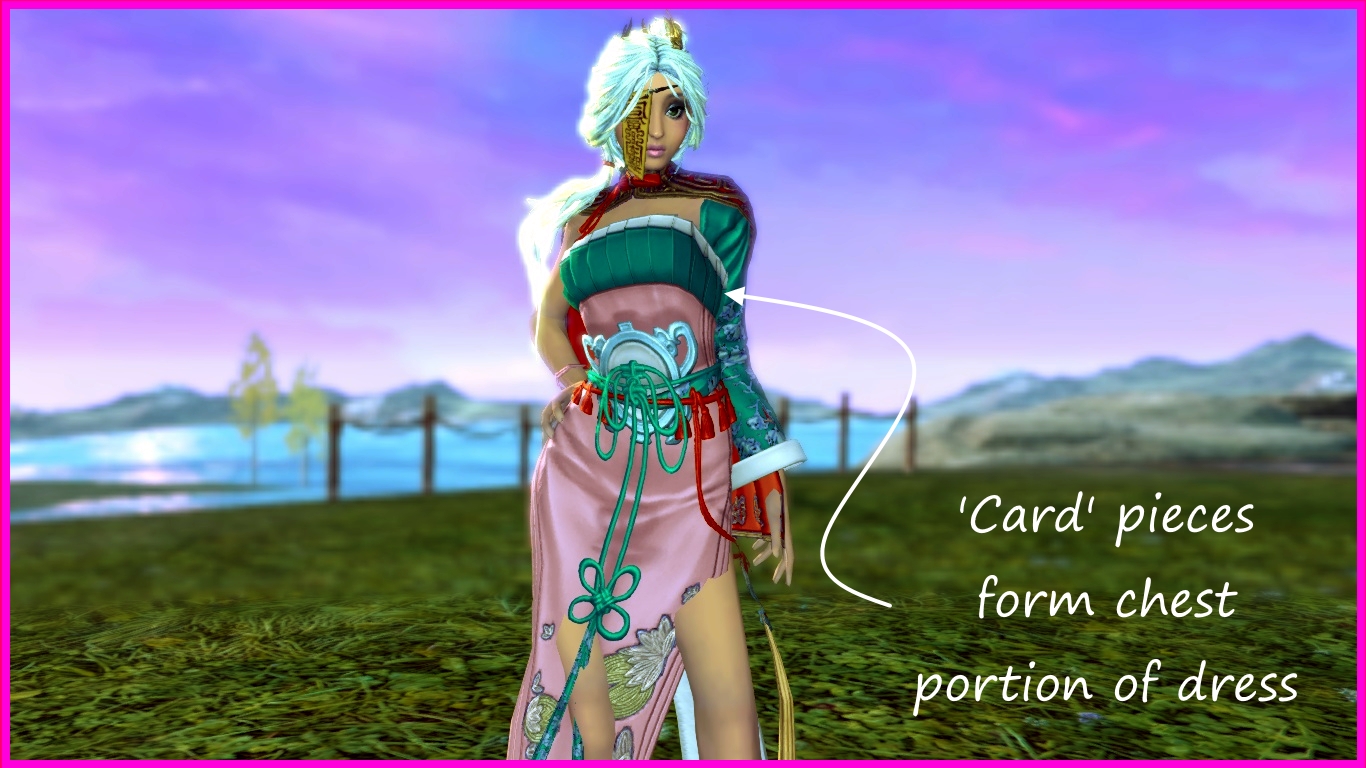
The chest portion is actually a separate structure from the rest of the main dress. The entire area wrapping around the chest is actually formed by multiple vertical 'card' structures.

Rear View - Original Outfit
We can see more embroidered lotus petals and a decorative butterfly knot at the back of the dress.

Rear Close-up View - Original Outfit

Left Side View - Original Outfit
The sides of the dress is like a Cheongsam, with inverted 'V' slits that shows off the legs.

Right Side View - Original Outfit
In the mod, I trimmed the length of the dress and removed those white pieces of cloth at the bottom. But after trimming, the dress is left with just a plain color, and so, I shifted the golden lotus petals patterns upwards, for both the front and back of the dress.

Next, I tried to adjust or re-arrange the red cloak but in the end, I took out majority of it, leaving just the collar portion.

Thereafter, I tried to see what can be done for the chest portion. Unfortunately, there is nothing that can be mod. As explained earlier, the turquoise-white portion that wraps around the chest is actually made up of several vertical 'card' structures and these structures share the same piece of texture. As such, any mod on that texture would affect the entire area. And removing the texture means that the entire area will be gone, leaving holes. Trimming it for a certain part would reveal hole at another area. In the end, I had to leave the chest portion untouched. 😥

Check out the modified outfit in the images below.

Front View - Modified Outfit
We can see the trimmed dress in the image above and below.

The lower portion of the decoration at the center of the dress had to be removed because it shared the same texture with the decoration at the back, which had to be removed because it is attached to the back portion of the dress to be cut off.

Front Close-up View - Modified Outfit

Rear View - Modified Outfit
The petals patterns can be seen shifted upwards to the remaining part of the dress.

Rear Close-up View - Modified Outfit
The red cloak has been removed, except the collar portion.

Left Side View - Modified Outfit

Right Side View - Modified Outfit

Right Side Close-up View - Modified Outfit
After the dress has been trimmed, the panties strap on the right hip becomes visible. Although I tried to turn the strap into skin, it seems that the mesh alignment is not perfect and will leave artifacts revealing the edges of the meshes where they meet. Even though I tried to mend it in the normal (N) texture, it did not seem to work either. Therefore, I had to leave the panties strap as it is. 😰

Eagle-eyed viewers might also noticed that the skin surface lacks details. That is because the entire skin area is represented by approximately only 110x130 pixels area and that size just is not sufficient to contain the required details. 😰

We have reached the end of this post. Watch the video for more details of the mod. However, since I do not have the outfit, it can only be captured with the in-game Tailorshop. Hopefully it is enough to show all the details. 😅


[Updated] A patron noticed that the skin color is darker and it seems to be the mask (M) file skin layer being given an incorrect alpha value. I have fixed it as shown in the image below.


Download Link